Fesco Bill Online Check 2026
Are you facing delays in checking your Fesco Bill Online? We understand how frustrating it is to wait for a paper bill, especially when due dates are missed
You don’t need to worry about it anymore! Within seconds, you can check your FESCO online bill. Just enter your 14-digit reference number to view, download, or print your bill instantly. Beyond just bill checking, this platform offers many helpful features.
You can read our blogs to learn how to save money by using electricity smartly during peak hours, explore available payment methods, check coverage areas, and much more
How to Check FESCO Duplicate Bill Online
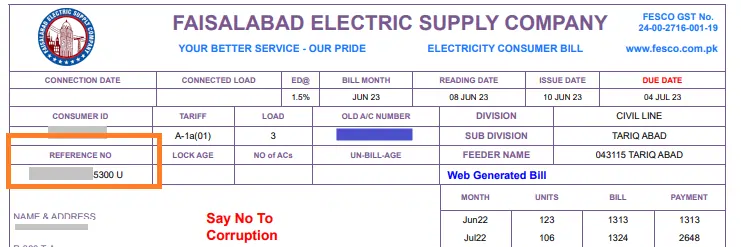
To check your FESCO online bill, you will need a unique 14-digit reference number. You can easily locate this number in the top-left corner of any previously printed or duplicate electricity bill, usually highlighted inside a prominent box.
For your convenience,we have provided an explanatory image below to show you exactly where to find the reference number on your physical bill statement.
About Faisalabad Electric Supply Company
FESCO is an electric utility company responsible for distributing electricity to eight districts in Punjab, Pakistan. It is an official government-owned entity, established in 1998, and is authorised and regulated by NEPRA (National Electric Power Regulatory Authority).
It currently provides electricity to approximately 5.8 million customers, serving an estimated population of over 26 million people. The company’s current CEO is Engr. M. Amir.
Known for its excellent operational performance and lower line losses than other regions in Pakistan, it is considered one of the most efficient electricity distribution companies in the country. It also has one of the highest bill recovery rates.
Faisalabad is the central hub of FESCO’s operations. It is often referred to as the “Heart of Manchester” for its world-renowned textile industry, which exports high-quality fabrics not only across Pakistan but also globally.
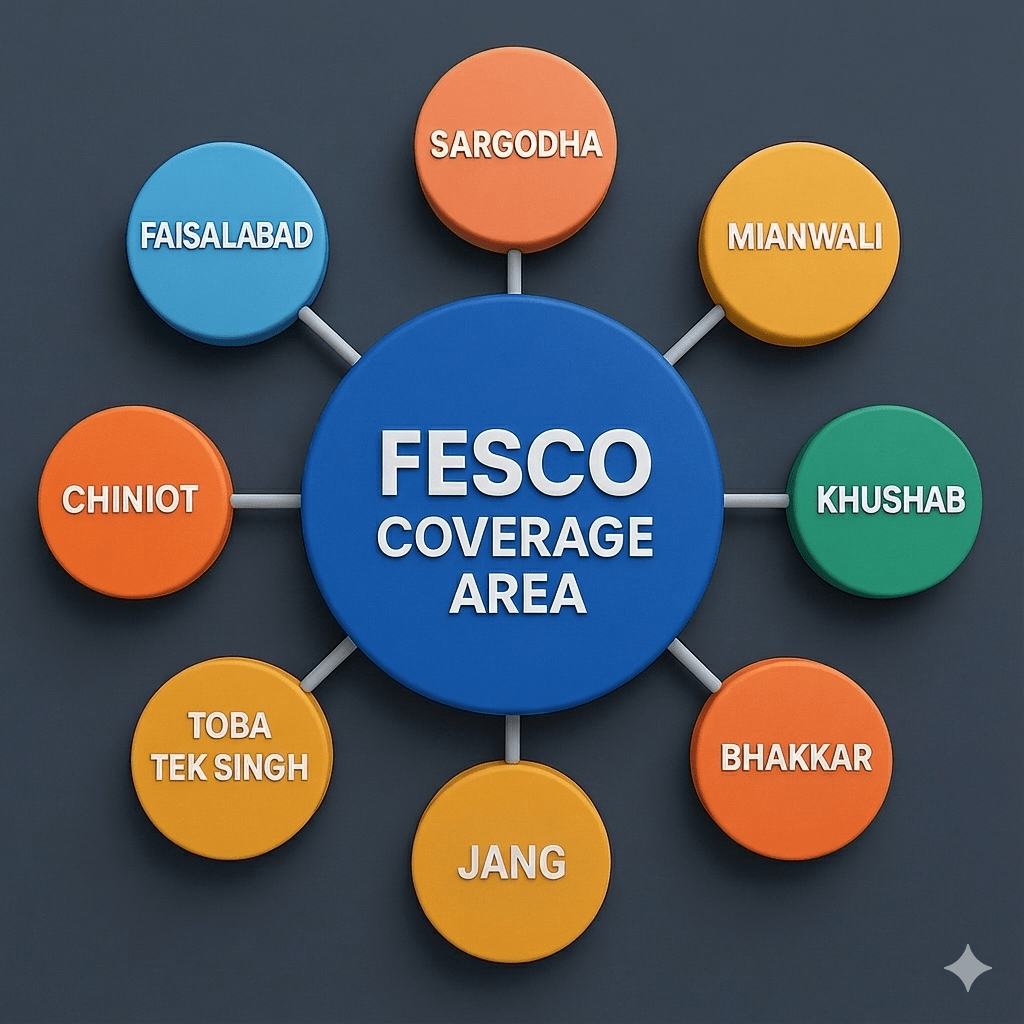
Fesco Coverage Area and District
Fesco is providing electricity to 8 districts and cities.
Districts and their Cities
Faisalabad District
Jhang District
Bhakkar District
Mianwali District
Sargodha District
Toba Tek Singh District
Khushab District
Chiniot District
Fesco Services

Key Benefits of Chaking Your Fesco Bill Online
FESCO plays an essential role in making Fesco bill online tracking easier and more accessible for the public.
The company has fully digitalised its billing system, allowing users to access complete, up-to-date information about their electricity bills with ease.
You can now easily check your current FESCO bill online, view your consumed units and previous bills, and even view your full billing history for the entire year. It includes detailed insights, such as the number of units you used each month, the amount you were billed, and the tax you paid to the Government of Pakistan during the financial year.
You can also check your current meter reading for complete transparency.
Top Benefits and Key Advantages of FESCO Online Bill Service
24/7 Instant Online Access
Check your monthly electricity statement anytime and from anywhere without visiting the physical FESCO customer support office. Our service ensures you can securely check your bill whenever you want.
No Registration or Signup Required
You do not need to go through tedious account creation, signup, or login processes to access your billing details. Simply enter your consumer details for instant access.
Fully Mobile-Responsive Interface
Our platform works seamlessly across all types of mobile, tablet, and desktop devices. The website layout is designed with a mobile-friendly interface to provide a smooth, fast, and optimized browsing experience.
FESCO Peak Hours Timings 2026
Faisalabad Electric Supply Company (FESCO) urges its domestic and commercial consumers to conserve electricity during designated peak hours. Managing your power consumption during high-demand windows is the most effective way to protect system stability and reduce your electricity bill
FESCO Peak and Off-Peak Schedule
FESCO electricity tariff rates vary dynamically depending on the current season. The official time-of-use (ToU) breakdown for peak hours across its 8 covered districts is structured as follows:
| Season | Peak Hours Timing | Off-Peak Hours Timing |
|---|---|---|
| June to August | 7:00 PM to 11:00 PM | Remaining 20 Hours |
| September to November | 6:00 PM to 10:00 PM | Remaining 20 Hours |
| December to February | 5:00 PM to 9:00 PM | Remaining 20 Hours |
| March to May | 6:00 PM to 10:00 PM | Remaining 20 Hours |
During peak hours, the strain on the national grid increases significantly. To avoid high per-unit tariff rates and prevent power interruptions, consumers are strongly advised to limit or avoid using high-load electrical appliances, including
Water Motors & Pumps (Fill water tanks before peak timings begin).
Air Conditioners & Heavy Heaters.
Washing Machines & Clothes Dryers.
Unnecessary Indoor or Extra Outdoor Lighting.
How to Check and Print Your FESCO Duplicate Bill Online
Checking and printing your FESCO electricity bill online is quick and straightforward. Follow these few simple steps to view, download, or print a duplicate copy of your bill instantly:
- Visit Our Portal: Open our dedicated FESCO bill checking website on your mobile or desktop browser.
- Locate Your Credentials: Retrieve your 14-digit reference number or 10-digit consumer ID from a previous physical bill statement.
- Enter Details: Input the reference number or consumer ID into the search field provided at the top of this page.
- Generate the Bill: Click on the “Check Bill” button to fetch your live utility data.
- View Your Statement: Your complete monthly billing history and current payable amount will immediately appear on the screen.
- Trigger the Print Command: Click on the “Print” or “Download” button located at the top layout of the digital statement.
- Complete Payment: Save the file as a PDF or print a hard copy to make your manual payment at any bank or post office.
How to Download and Print FESCO Tax Certificate Online
If you need your electricity tax statements for income tax filing, you can easily fetch them through our portal. Follow these simple steps to download your FESCO withholding tax deduction certificate for the current financial year:
Here are a few steps to help you print your tax certificate
1 Enter Your Details: Input your unique 14-digit reference number or 10-digit consumer ID in the input field above.
2 Fetch the Statement: Click on the search/check bill button and wait for your current month’s statement to load completely.
3 Locate the Tax Section: Once the digital bill appears on your screen, click on the “Tax Certificate” button usually located in the top-right corner toolbar.
4 View Deduction Details: The official FESCO income tax deduction certificate for the current financial year will instantly appear on your screen.
5 Save or Print: Click the download icon to save it as a PDF or send a print command for your official tax filing documentation
TOU / TOD Meters (Time of Day)
FESCO provides users with advanced TOU (Time of Use) or TOD (Time of Day) meters, which record electricity consumption dynamically based on the time of day. These smart meters track exactly how many units you consume during different intervals. Different tariff rates are then applied depending on whether your electricity usage falls within peak or off-peak hours 3,4.
How to Fix FESCO Bill Online Not Found Error
If you encounter a “Bill Not Found” error while checking your utility statement online, do not panic. This issue usually happens due to a tiny typographical mistake. Follow these quick instructions to resolve it instantly:
- Verify Your 14-Digit Reference Number: Double-check every single digit against your previous physical bill statement. Entering even one wrong digit or adding unnecessary spaces will result in an error.
- Check the Consumer ID Length: If you are using your customer ID instead of a reference number, ensure you have entered the exact 10-digit numeric code correctly.
- Remove Alphabetical Affixes: Make sure you only enter numbers in the input box. Do not manually type alphanumeric codes like “U” or “R” (which denote Urban/Rural indicators) unless specified by the system tool.
How to Register for FESCO Bill SMS Alert Service
Faisalabad Electric Supply Company offers a free SMS alert service to all its consumers, allowing you to receive your monthly billing details directly on your mobile device. This service is ideal for individuals who want to track their bills instantly and avoid waiting for physical paper statements.
Step-by-Step SMS Registration Method via 8118
To subscribe to the monthly automated SMS updates, follow this standard procedure set by the utility network:
Compose a New Message: Open the SMS application on your mobile phone.
Type the Keyword: Enter fesco followed by a space, and then type your 14-digit reference number (e.g., fesco 12345678901234).
Send the Code: Send this text message to the official shortcode 8118.
Confirmation: You will receive a verification reply confirming your successful registration for monthly automated alerts.
How to Subscribe to FESCO Bill Email Alert Service
If you prefer tracking your utility bills digitally rather than waiting for paper copies or text messages, the FESCO email billing service is the perfect option. By subscribing to this free feature, you can receive your comprehensive monthly duplicate bill statement directly in your email inbox every month without any delivery delays.
Step-by-Step Email Subscription Method
To register your email address with your FESCO consumer account, follow these simple instructions:
Access the Portal: Click on the dedicated email subscription section on the portal or visit the official FESCO E-bill registration page.
Provide Account Details: Enter your unique 14-digit reference number inside the consumer details field.
Enter Your Email: Type your active email address correctly in the registration form box.
Submit Application: Click on the “Submit” or “Subscribe” button to activate the automated monthly delivery loop.
“
Core Aim and Mission of FESCO
The primary aim of the Faisalabad Electric Supply Company (FESCO) is to distribute stable, safe, and affordable electricity to its massive consumer base without unnecessary disruptions. As a leading power distribution company, its organizational vision focuses on brightening the central region of Punjab by boosting energy infrastructure across residential, commercial, and industrial sectors.
FESCO consistently strives to maintain sustainable power grid operations under all seasonal conditions to support Pakistan’s textile hubs, manufacturing plants, and vast agricultural lands. The company’s core mission is to provide efficient electricity access to every consumer category, including low-income households, without compromising on transmission quality or customer care.
Official FESCO Bill Online Payment Methods
Faisalabad Electric Supply Company allows its consumers to settle their monthly electricity bills through multiple convenient channels. Whether you prefer digital banking apps from home or physical cash counters, you can choose from various online and offline methods:
Mobile Wallets (Easypaisa & JazzCash)
Mobile wallets are the fastest way to check and pay your utility statements instantly.
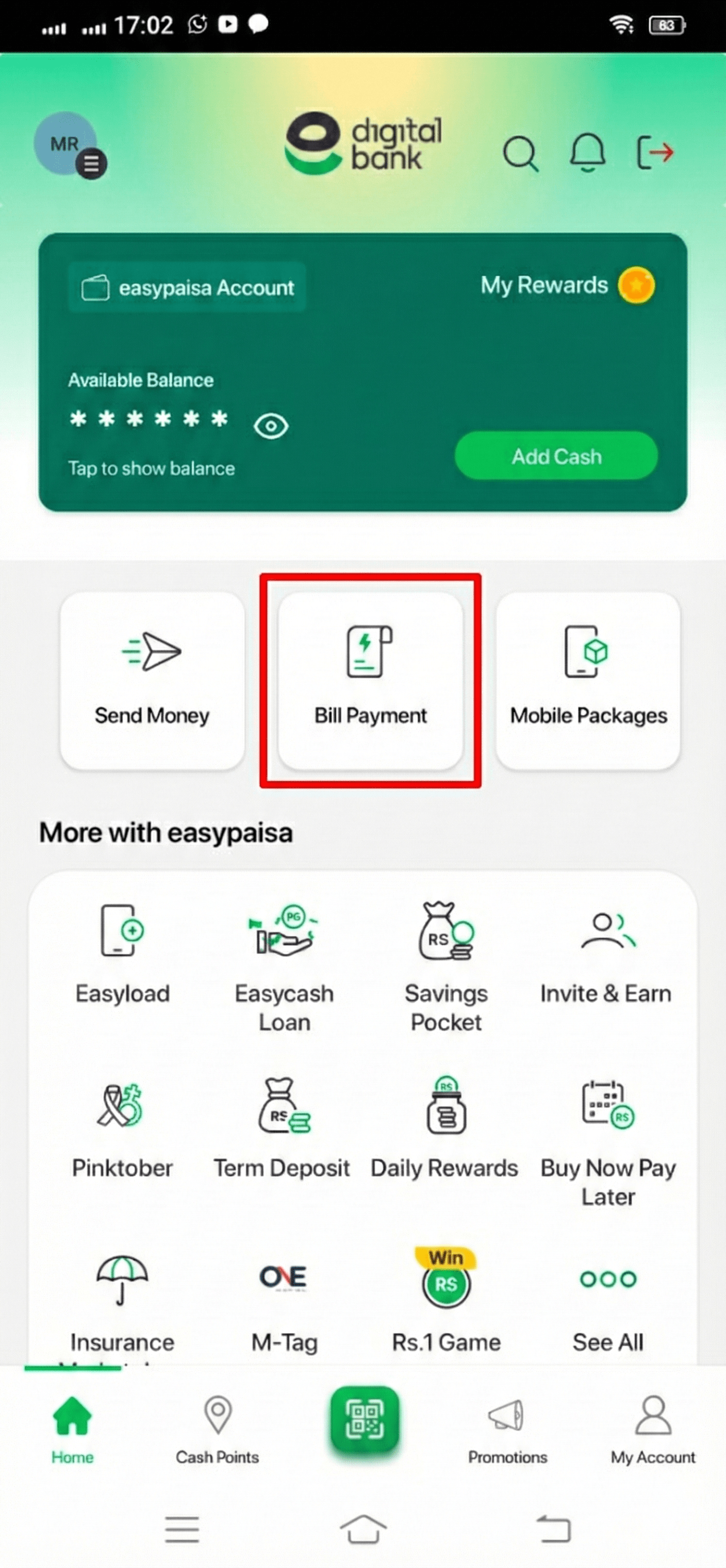
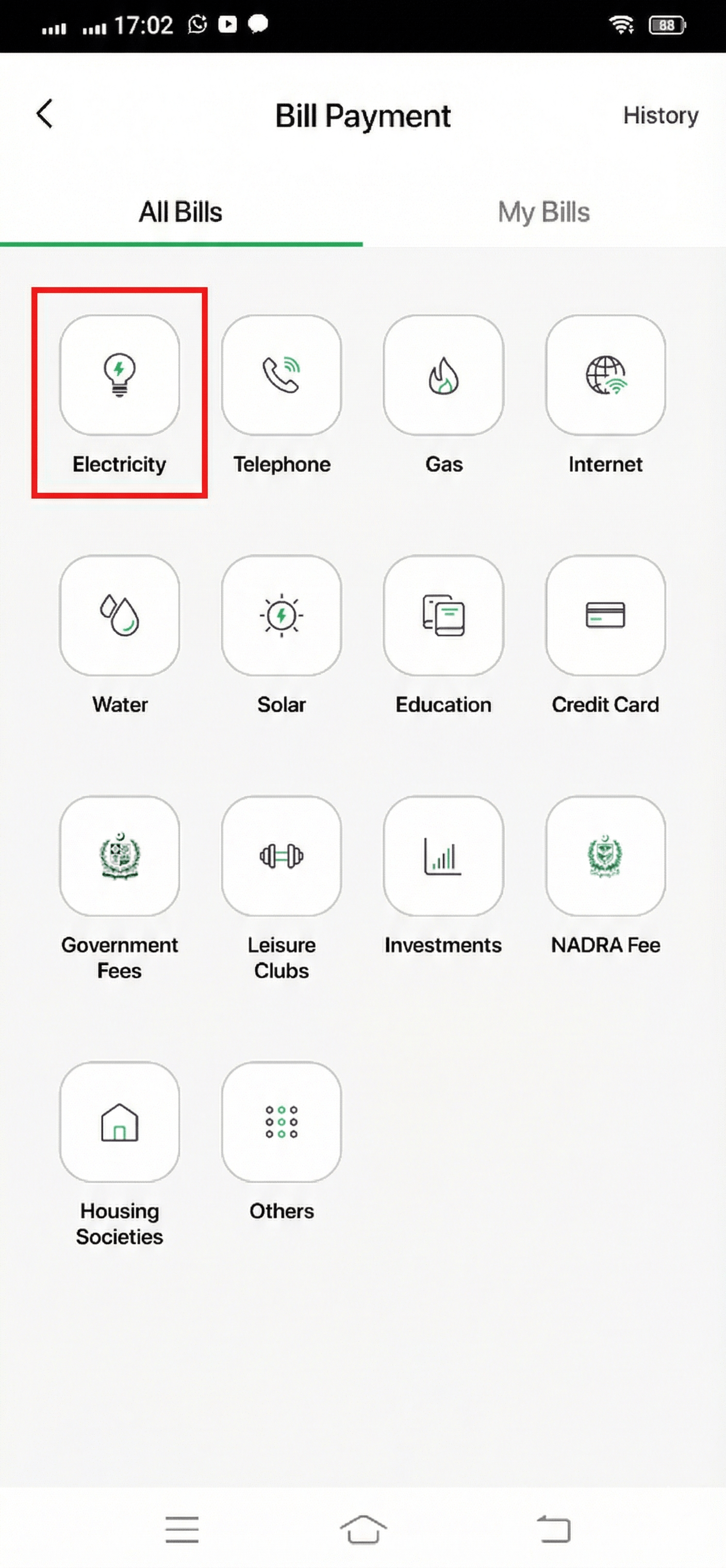
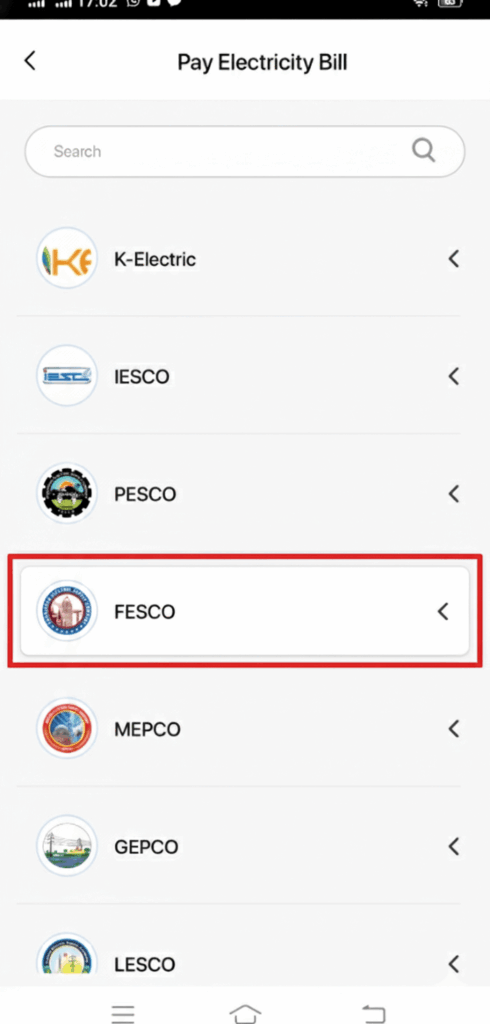
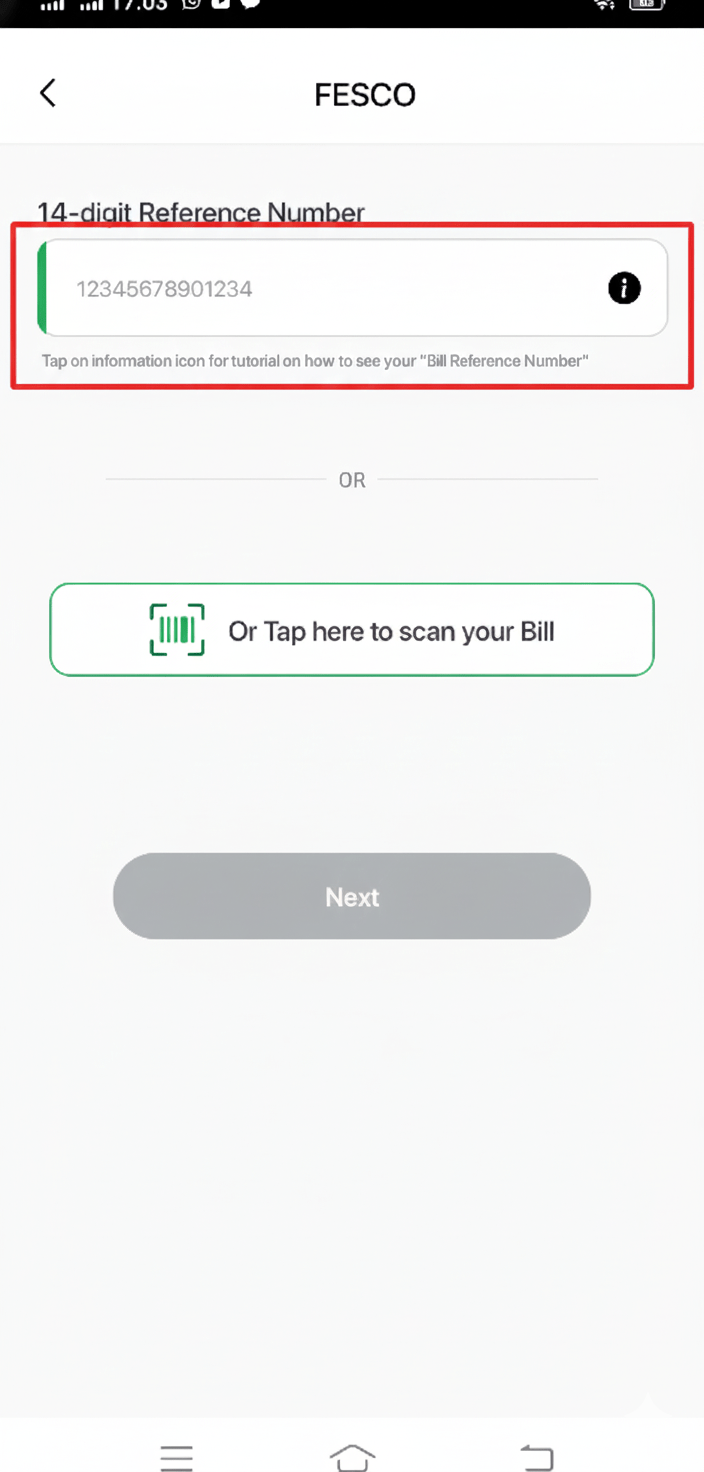
Easypaisa App: Log in to your app, navigate to “Bill Payment”, select “Electricity”, choose “FESCO”, enter your 14-digit reference number, and click pay.
JazzCash App: Open your wallet dashboard, tap on “Utility Bills”, select “FESCO”, verify your consumer details, and confirm the transaction securely.
Commercial Internet Banking & Apps
Most retail and commercial banking applications in Pakistan support instant utility payments. You can securely pay your duplicate bill via:
How to Pay FESCO Bill via Bank Alfalah Mobile App
If you are a Bank Alfalah account holder, you can easily settle your electricity statement through the official Alfa mobile application. Simply open the app, navigate to “Bills & Payments”, select “Utilities & Bills”, and choose “Electricity”. Once you enter your unique 14-digit reference number, your full billing details will appear instantly for secure checkout.
Supported Online Payment Platforms
Beyond traditional banking apps, you can check and pay your utility bills instantly through various registered fintech platforms, including:
Mobile Wallets: Easypaisa, JazzCash, and Upaisa apps.
Digital Banking: SadaPay, NayaPay, and internet banking portals.
Universal Access: Any authorized mobile wallet application that supports digital bill payment services in Pakistan
Authorized Offline Payment Locations
For consumers who prefer manual transactions, you can print a duplicate copy of your bill from our portal and submit cash at any of the following designated branches:
- Commercial Banking Network: All commercial and microfinance bank branches across Pakistan.
- Postal Services: Any local Post Office (Pakistan Post).
- Courier & Retail Centers: Designated TCS Express Centers and retail shops.
Understanding Taxes and Charges on Your FESCO Bill
When you check your duplicate utility statement, the final payable amount includes multiple government taxes, duties, and seasonal adjustments. Understanding these individual billing components helps you track where your money goes:
Fuel Price Adjustment (FPA)
Fuel Price Adjustment (FPA) directly reflects the fluctuating cost of fuel used by power generation companies to produce electricity. This federal tax component varies every month based on international fuel price changes.
Fixed Monthly Charges
Fixed charges are a mandatory baseline cost that consumers must pay each month, regardless of their actual power consumption. It is determined by your total connection type and sanctioned load.
Variable Energy Charges
Energy charges represent the actual cost of the electricity you consume during the billing cycle. This specific amount is calculated by multiplying your total consumed units with your respective seasonal tariff slab rates.
Government Taxes & Surcharges
FESCO acts as a collection agent for several regulatory bodies, embedding federal levies directly into your invoice:
General Sales Tax (GST): A standard 17% tax applied to your overall energy charges and current fuel adjustments.
TV License Fee: A static statutory charge of Rs. 35 for domestic connections collected for Pakistan Television Corporation.
Withholding Income Tax: Applicable under Section 235 on non-active taxpaying accounts or higher monthly bills.
Provincial Electricity Duties
Electricity Duty is a specialized provincial tax levied on your net electricity consumption. For domestic and commercial users across Punjab, it is generally calculated as 1.5% of the total variable electricity cost. [1]
FESCO Head Office Address & Contact Location
If you need to visit the main administration or submit manual applications regarding billing disputes, new meter tracking, or technical complaints, you can access the central headquarters. Below is the official physical address of the Faisalabad Electric Supply Company:
FESCO Headquarters Address Details
Location Office: FESCO Head Office, West Canal Road, Abdullahpur, Faisalabad, Punjab, Pakistan.
Postal/Zip Code: 38850
Official Geographical Coordinates: C4G7+89G West Rakh (As displayed on the active radar grid)
Fesco Helpline
If you have any inquiries, operational questions, or immediate billing disputes, please consult the official phone directory provided below. Feel free to reach out to the customer support team through the designated emergency contact lines. For central system issues, users can also register digital claims directly via the automated FESCO customer complaint portal.
Official FESCO Contact Support Chart
Central Emergency Lines (Phone): +92 (41) 9220184 – +92 (41) 9220229
Official Telefax (Fax): +92 (41) 9220233
Headquarters Webmail (Email): caudit@fesco.com.pk
Centralized Complaint System (CCMS Email): ccms@pitc.com.pk (Fesco bills automated complaint routing address)
Toll-Free UAN Help Number: 0800-66554 (Available 24/7)
National Power Helpline: Dial 118 from any mobile setup
HELPLINE